
You have been watching for a particular camera for weeks. Finally one turns up at a sensible price. The photos are sharp, the seller has feedback, the title reads like every other listing for the same model.
Then, halfway down the description, a line that does not quite belong: buy it direct on our website.
That single line is the whole scam. This kind of marketplace listing scam does not need to win an argument with you in the chat, fake a payment screenshot or invent a courier. It only needs you to leave. Once you buy somewhere other than the platform you found the listing on, almost every protection you thought you had disappears.
What a buy-direct listing scam looks like
The listing itself is usually unremarkable. Recently, while testing how our own scam checks perform against real listings, we looked closely at one for a high-end compact camera that retails for around USD 6,000 on eBay. Nothing about the price, photos or seller feedback stood out. A person reviewing it flagged it anyway.
The evidence was in the text. The seller's description told buyers to purchase directly from an external website. A short subtitle under the title repeated the same instruction on its own. The website's domain had been registered only days before the listing went up.
That is the pattern in full: the listing is an advertisement, and the actual transaction is designed to happen somewhere you have no protection at all.
Why leaving the platform is the signal, not a side detail
Marketplace buyer protection is tied to the marketplace. eBay's Money Back Guarantee, PayPal's purchase protection, dispute resolution, payment reversal, and the seller's reliance on their own feedback score all depend on the sale happening where the listing lives.
A website you were sent to from a listing offers none of that. If the camera never arrives, there is no case to open, no platform to escalate to, and often no real business behind the site to chase.
So treat any instruction to complete a purchase somewhere else as the warning itself, not one yellow flag among many. eBay's own rules prohibit sellers from offering to sell items outside the platform, and legitimate sellers have no reason to route you away mid-listing. It is the same move behind many fake payment link scams: get the buyer somewhere the marketplace cannot protect them.
The formatting tricks that hide the link
What made this listing worth writing about was how the instruction was written.
The web address had spaces around the dots, something like www . example . com. To you, that still reads as a web address. To software scanning listings for external links, it often is not one; it will not turn into a clickable link, and it may not match a filter looking for ".com".
The words around it looked slightly off too. In phrases where the words were plainly "IN" and "IT", the capital I appeared to have been swapped for a lowercase L, which looks almost identical in most fonts but is a completely different character to a computer.
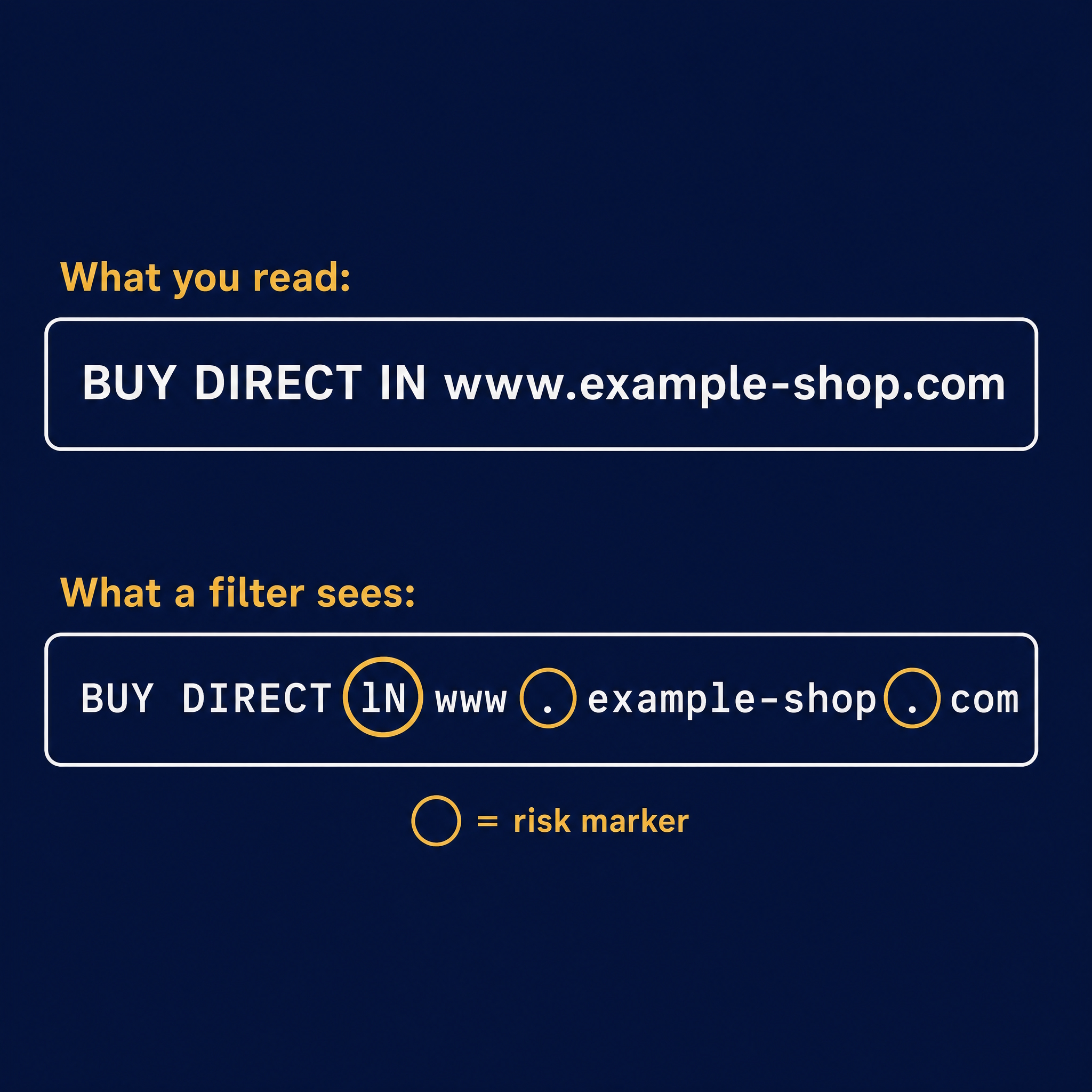
You do not need to know exactly how filters work to use this. The practical lesson is simple: if a web address, email or phone number in a listing looks oddly written, the oddness may be the point. Common versions include:
- Spaces or brackets inside a web address, such as "www . site . com" or "site (dot) com"
- Phone numbers written partly in words, such as "zero four one two"
- Letters that look right but sit strangely, like a lowercase l standing in for a capital I, or a zero standing in for the letter O
- Contact details placed in an image rather than the text
A genuine seller wants to be found easily. Someone deliberately making their contact details harder for a machine to read is usually trying to avoid being caught by one.
Check how old the website is
If a listing does point you to a website, one of the fastest checks is how long that website has existed. Domain registration dates are public and free to look up in a couple of minutes.
A shop selling cameras worth thousands of dollars whose website was created last week is not an established business. An older domain is not proof of legitimacy either, since domains can be bought or compromised, but a brand-new one attached to high-value stock and an urgent "buy here instead" instruction is a combination worth walking away from. We will cover exactly how to run that check in a follow-up post.
A plain listing is not proof, but it is a clue
One softer observation from our testing, offered as context rather than a rule: the established dealers we looked at tended to have elaborate listings, with returns policies, shipping details and storefront layouts. The suspicious listings tended to be plain text.
A simple listing from a private seller is completely normal, so do not read too much into this on its own. But if someone is selling expensive stock like a business, and their listing looks nothing like a business, it is reasonable to ask why.
What to do if you see a buy-direct listing
- Do not follow the link or contact the seller off-platform. Even visiting the site can expose you to fake checkout pages designed to capture card details.
- Buy only through the marketplace's own checkout. If the seller refuses, that answers the question.
- Report the listing to the platform. On eBay, use the report option on the listing page; most marketplaces have an equivalent.
- Check the domain age if you are curious or unsure, but treat the off-platform instruction as enough reason to walk away regardless.
- If you have already paid, contact your bank or card provider immediately, then report it to Scamwatch in Australia, Action Fraud in the UK, or the FTC in the US.
How Chekka helps
Chekka is being built as a second set of eyes before you pay, ship, click or move off-platform. Paste in a marketplace listing, a message or a link, and it highlights the signals worth a closer look, such as instructions to buy elsewhere and web addresses that have been disguised.
It will not catch every scam, and we are open about that; testing against real listings is exactly how we found the gaps in our own checks. But it can help you see risk more clearly in the moment it matters.
We are currently asking buyers and sellers about the scams they have run into. If you have two minutes, take the Chekka survey, and share this post with one person who buys or sells online.